Sending a Declaration
Sending to UKBF
Once all the required fields are complete click next button (it is present on all three tabs/pages of teh GARform. And select ‘send forms’
MyGar/Manifest6 implements quite strict validation rules. if there are missing pieces of info it will warn you. In addition it will highlight anomalous items such as a crew member who is a ‘minor’ and finally the UKBF will not accept submissions in advance of 48 hours. With other systems these may well disappear into some dustbin leaving you thinking you’ve submitted. You have only submitted successfully when you get a receipt number.
If all the data is complete and the timescale is correct a ‘busy’ indicator will appear. It sends to 2 UKBF systems and takes a short while
You will then get a result page ‘popup’
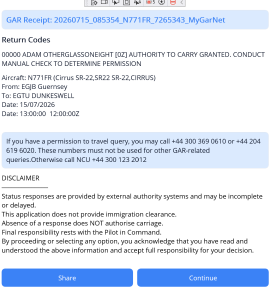
Things to note – the GAR receipt is displayed across the top of this popup. The next few lines show the results of the crew/pax ‘permission to travel’ . This is followed by the flight details.
At the bottom there is a ‘share’ button. you may forward this information by email, whatsapp or text to whomever you choose. You may wish to send to yourself as an easy access record or print. you dont really need to do this as all this information is available within the app but sometimes demonstrating you have receipt and authorisation is easier if you can hand over a paper copy.
Sending to another jurisdiction or airport/FBO
MyGar/Manifest6 will produce Gendecs for non UK destinations
The following jurisdictions have their own Gendec form which is faithfully reproduced by the app.
- Jersey
- Guernsey(alderney)
- Isle of Man
- Ireland
- France
- Belgium (subject to further info re whether they mandate their own online filing or will accept email)
- Netherlands (subject to further info re whether they mandate their own online filing or will accept email)
For all others MyGar/Manifest6 will create a standard ICAO gendec which is usually acceptable