Settings
Settings
The Settings screen is where you connect the app to external services and set your personal defaults. Most fields only need to be filled in once. It is worth noting that many are entirely optional. Even the MyGar.net user name and password are only required if you wish to use UKBF electronic submission.
MyGAR account
| Enter your MyGAR username and password here — the same credentials you used to register on this website.
This is required if you want to:
You only need to enter these once. If you have not yet registered, register here first. |
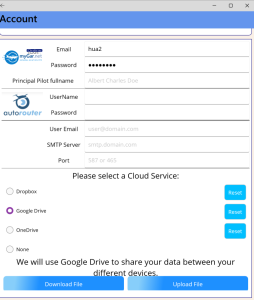 |
Autorouter account
| Autorouter.eu is a flight plan route finder and submission portal, primarily used for IFR flights.
If you enter your Autorouter credentials here, the app can:
Note: flight plans do not contain crew or passenger information, so those fields will still need to be completed manually. Support for importing flight plan data from other sources such as Foreflight is currently under development. |
Other settings
|
← Back to Help Home | Manifest6 Help — last updated June 2026